Solving Peppol validation errors
in Odoo
Is an electronic invoice from Odoo stuck on a Peppol validation error? Here you find the cause and the solution for each error code.
PEPPOL-COMMON-R043
Belgian enterprise number in the wrong format
Error message
The XML document did not pass the Schematron validation. Schematron Validation failed with error: Fatal: [PEPPOL-COMMON-R043]-Belgian enterprise number MUST be stated in the correct format.
Cause
Your customer's enterprise number (Company ID) contains dots, spaces or other characters. Peppol only accepts a fully numeric format.
0123.456.789
0123456789
Solution in Odoo
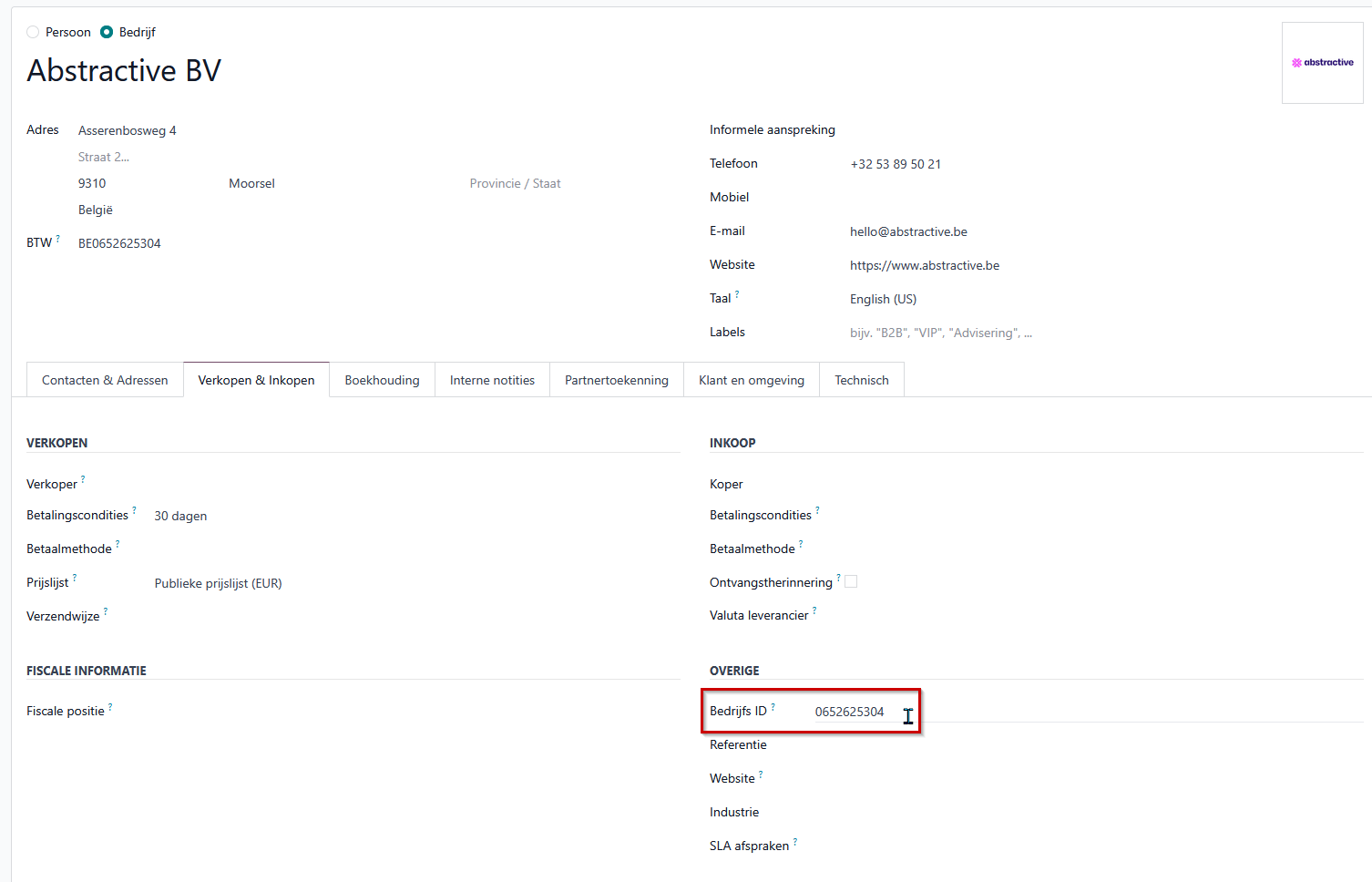
Go to Contacts, open the customer record and, on the Sales & Purchase tab, look at the Company ID field. Remove all dots and spaces. The number consists of exactly 10 digits and starts with 0 or 1.
Example
Stuck with a different Peppol error?
Report it through our support form. Want your entire invoicing to run without manual work? Discover accounting with Odoo or book a free introductory meeting. After the free introductory meeting, we use the information from our conversation to prepare a free demo tailored to your business.
Report your Peppol error